
Step-by-step work orders
Customer details, a Google account snapshot, junk app removal, cache cleanup and a PDF report to hand the customer.
PopStop finds and removes pop-up ad apps, fake antivirus “cleaners” and other junk apps from Android phones. PopStop Tech is the edition for phone repair shops and technicians, and one key covers 3 shop phones.
Free for 7 days. No card needed.
Android 8.0 or newer · 149 KB APK · Version 1.0.0 · Android only, not for iPhone
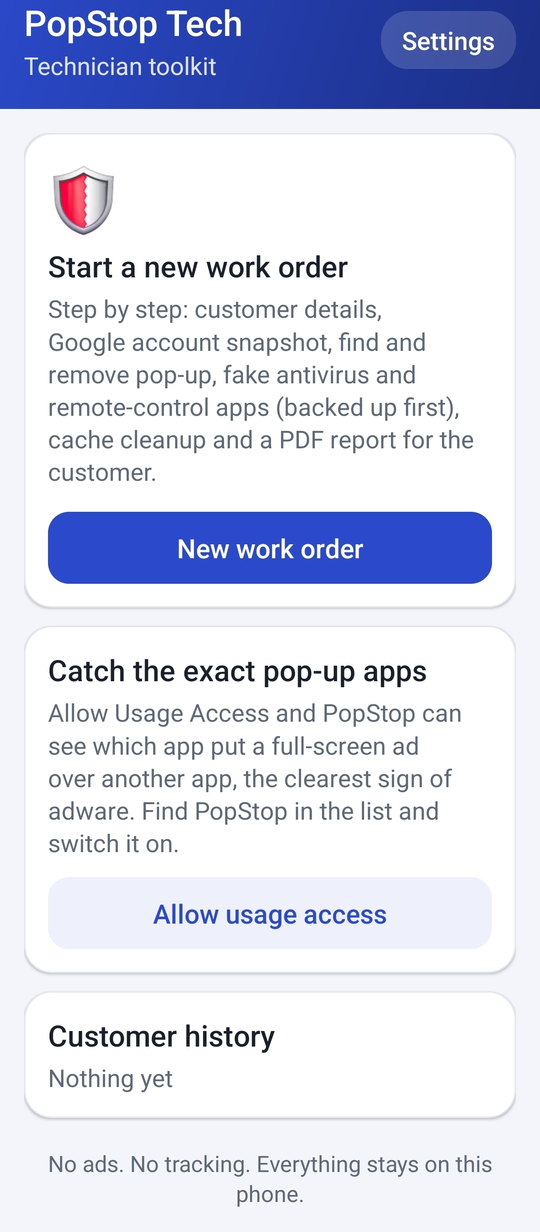
Customer details, a Google account snapshot, junk app removal, cache cleanup and a PDF report to hand the customer.
Finds pop-up ad, fake antivirus and remote-control apps, and backs each one up before it's removed so you can restore it.
With Usage Access on, PopStop sees which app threw a full-screen ad over another app, the clearest sign of adware.
Every job is saved on the phone, so you can look back at what you found and fixed for each customer.
No ads. No tracking. Everything stays on the phone. Read the PopStop privacy policy.
Full pricing · Free test agreement (PDF) · How the trial works · Privacy policy
Text or email Preston with your shop name and he'll send you a trial key, usually the same day.
Text (417) 712-6763 or email portermercantile25@gmail.com. Keys look like PSTK-XXXX-XXXX-XXXX.
Android only (8.0 and newer). There is no iPhone version.